A generation failed
What happens to your balance and how to get the result you want next time.
If a generation fails because of a technical error on our side or the model’s side, the money is refunded to your balance automatically. The form shows an “Error” card with the reason and a note that the money was refunded to your balance.
When the money is refunded
- a technical failure of the service or the model provider;
- the request was rejected by a safety filter;
- the task ran for more than 30 minutes — it ends with a “Timeout” error and the money is refunded to your balance.
If you just don’t like the result
Try refining the prompt or switching models. There is no refund for a result that doesn’t meet expectations — that is the nature of AI models.
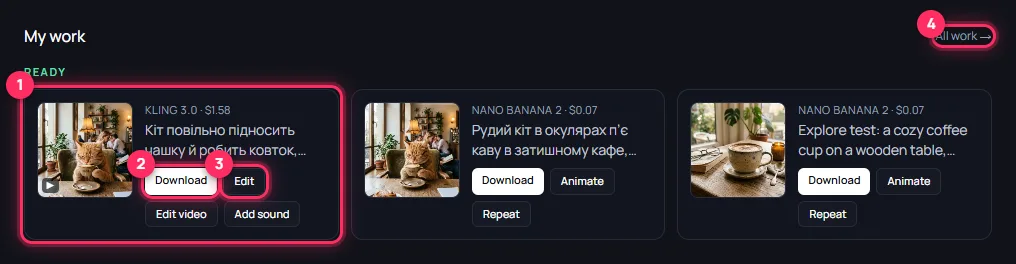
The quickest way to try again is the “My work” feed on the dashboard home: find the result card (1 in the screenshot) and click “Edit” (3) or, under images, “Repeat” — the form opens with the same model and prompt. All results are behind the “All work →” link (4).
- use the ready-made prompt templates above the prompt field;
- be more specific: subject, action, setting, light, style;
- run the same prompt in another model — models interpret descriptions differently.
Same error again and again on one model? Contact support with the model name, the error text and the time — we’ll look into it.