Seedream 4.0 Review: Anime, Manga and Illustrations Online
Seedream 4.0 by ByteDance is a strong model for anime, manga, concept art and stylized illustrations. Here is what it does, what it costs and how to prompt it.
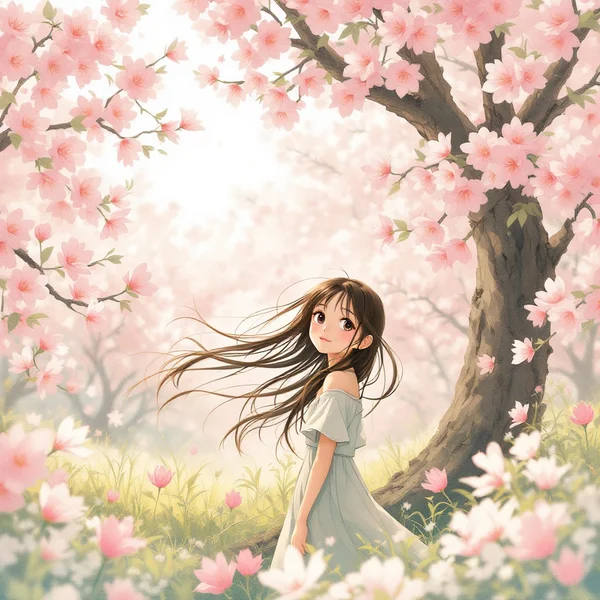
This Seedream 4.0 review is for illustrators, comic artists, game designers, social media managers and anyone who needs stylized artwork rather than photos. Seedream 4.0 is an image model from ByteDance that excels at anime, manga, concept art and illustration. It holds a style well, so characters, scenes and backgrounds look like they belong in the same art book.
Price is the other argument. In WebTerra AI one Seedream 4.0 image costs about five cents, so you can comfortably run dozens of variations while hunting for the right angle or palette. It all works online in the browser — no installs and no powerful graphics card required.
Below we cover what the model can do, how to use Seedream 4.0, its pricing, ready-made prompts, a workflow for character series, tips and an honest comparison with other models in the service.
What Seedream 4.0 can do
The model’s focus is stylization. Where photorealistic models try to make things look like a camera shot, Seedream 4.0 happily draws in a specific artistic manner: anime, manga, watercolor, flat vector art, concept art.
- Anime and manga. Characters with expressive eyes, clean outlines and characteristic shading; scenes in the spirit of Japanese animation.
- Concept art. Locations, characters and props for video games, films and tabletop games.
- Stylized illustration. Covers, editorial illustrations, children’s book art, greeting cards.
- Icons and vector art. Icon sets and flat illustrations for websites and apps.
- Classic scenarios. Portraits, product shots, landscapes, food, interiors and lifestyle scenes are covered too — especially when they call for an artistic treatment.
The main mode is text-to-image. The dashboard form also lets you attach one reference image to hint at composition or mood. For a quick start there are templates: anime character, icons and vector art, cinematic portrait, product shot, landscape, food photography, social media creative, interior, fashion editorial and lifestyle photo.
Seedream 4.0 specs
| Parameter | Value |
|---|---|
| Developer | ByteDance |
| Type | Image generation |
| Input | Text |
| Reference image | 1 |
| Focus | Anime, manga, concept art, stylized illustration |
| Price per generation | $0.09 at 1024×1024 |
How to use Seedream 4.0 in WebTerra AI
- Sign up for WebTerra AI — a free trial balance is added to your account.
- Open the image generator in your dashboard and choose Seedream 4.0.
- Pick a template such as “Anime character”, or write your own prompt.
- Describe the character or scene: who, doing what, where, in which style, with which colors and lighting.
- Optionally attach one reference image.
- Generate. Not happy? Change one detail and run it again — the price makes experimenting easy.
All image models and a comparison of their strengths live on the image generation page.
Seedream 4.0 pricing
The cost of one generation with the default settings (a 1024×1024 image):
| Plan | Cost, USD |
|---|---|
| Any plan or top-up pack | $0.09 |
The free trial balance you receive on sign-up covers 7 Seedream 4.0 images — enough to draw a character in several poses, test styles for a cover or make a set of illustrations for a post. Plan details are on the WebTerra AI pricing page.
Seedream 4.0 is one of the most affordable image models in the service, which makes it a great sketchpad: explore ideas here, and if the final piece needs exact text or photorealism, finish it in a specialized model.
Seedream 4.0 prompt examples
Write prompts in English — the model understands style names and art terms most precisely in English.
1. Anime character
Anime-style portrait of a young girl with short silver hair and a red scarf, standing on a rooftop at sunset, city skyline behind, soft warm light, detailed eyes, clean line art, vibrant colors
A classic anime portrait: appearance, a clothing detail, location, lighting and line style.
2. Hand-painted animation scene
Hand-painted animation style scene of a small countryside house with a garden, fluffy clouds, a cat sleeping on the porch, warm summer afternoon, soft watercolor textures
A cozy painted scene for a greeting card, a cover or a post.
3. Manga panel
Black and white manga panel, a samurai drawing his sword in the rain, dramatic angle, speed lines, high contrast ink shading
A dynamic monochrome panel for a comic or an art book.
4. Location concept art
Fantasy concept art of a floating island city with waterfalls, glowing crystals, airships in the sky, epic wide shot, painterly style, golden hour lighting
A wide fantasy establishing shot for a game or a tabletop campaign.
5. Icon set
Set of 9 flat vector icons for a travel app: plane, suitcase, map, hotel, camera, ticket, passport, compass, beach umbrella, consistent line weight, pastel colors, white background
A consistent icon set. List every icon and define a shared style.
6. Editorial illustration
Flat editorial illustration of a person working on a laptop surrounded by plants and coffee cups, calm mood, muted green and beige palette, minimal shapes
A calm illustration for a blog, a newsletter or a presentation.
Tips for prompting Seedream 4.0
Name the style explicitly
“Anime style”, “manga panel”, “watercolor illustration”, “flat vector”, “painterly concept art” — put the style at the start or the end of the prompt. The more specific the name, the more stable the result.
Describe characters through details
Hair color and length, outfit, accessories, emotion, pose. If you plan a series with one hero, keep that description and repeat it word for word in every prompt.
Set lighting and palette
“Golden hour”, “neon night”, “soft morning light”, “pastel palette”, “muted earth tones” — these words shape the mood as much as the subject does.
Think about composition
Specify framing and angle: “close-up portrait”, “full body”, “wide shot”, “low angle”. For covers, add “empty space at the top for a title”.
Use the low price to explore
Generations are cheap, so start with several takes on one prompt, choose a direction and only then refine the details.
Do not overload the prompt
Three or four key ideas work better than ten. When a scene has too many objects, the model may sacrifice detail.
Workflow: from idea to an illustration series
The low cost lets you treat Seedream 4.0 the way an artist treats a sketchbook: lots of quick sketches first, then selection and polish. Here is a simple routine for a series — for a comic, a game or a recurring social media feature.
- Define the style. Write one sentence describing the look: “anime style, clean line art, soft pastel colors, warm lighting”. This is your style block, added to every prompt.
- Create a character sheet. Appearance, outfit, accessories, one signature detail. Generate 4–5 takes and pick your favorite.
- Lock the description. Copy the exact wording that produced the best result and do not change it.
- Change only the scene. In each new prompt, vary the action, location and angle, keeping the style block and character description intact.
- Select and polish. Keep the best take from each scene. Small fixes — outfit color, a background detail — can be made in a prompt-based editing model.
This will not guarantee a perfectly identical character every time, but it noticeably improves recognizability across a series and saves money.
Use cases
- Illustrators and artists. Quick idea sketches, palette and composition studies, references for further work.
- Game development and tabletop games. Character and location concept art, card illustrations, UI icons.
- Comic and webtoon creators. Panel roughs, character design, backgrounds.
- Social media and content marketing. Bold stylized images for posts, Reels covers, article illustrations.
- Web and app designers. Icon sets, flat illustrations, empty-state screens.
- Education. Illustrations for kids’ materials, presentations and flashcards.
Seedream 4.0 vs other image models
| Model | Strength | Choose it over Seedream 4.0 when |
|---|---|---|
| FLUX.2 Pro | Photorealism, portraits | You need an image that looks like a real photo |
| Nano Banana 2 | 4K, text in images | You need high resolution or lettering in the image |
| Ideogram V3 | Posters and flyers | Typography and text layout are the priority |
| Recraft V3 | Vector graphics | You need true vector art for logos, icons and branding |
The honest summary: Seedream 4.0 is an excellent starting point for anime and stylized illustration and one of the best-value models in the service. If the result must be photorealistic, text-heavy or delivered as vector, go straight to a specialized model. For targeted edits to a finished image, FLUX Kontext Pro is a good fit.
Limitations
- Built for stylization. It can produce photorealistic shots, but its strength is artistic styles.
- One reference. The form accepts a single image, so complex collages from several sources are not its job.
- Text in images. For text-heavy posters, pick a model that specializes in typography.
- Character consistency. For a series with one hero, keep an identical detailed description and expect a few attempts.
FAQ
How much does one Seedream 4.0 image cost?
$0.09 for a 1024×1024 image on any plan.
How many images can I make for free?
The free trial balance covers 7 images.
Can Seedream 4.0 draw in anime style?
Yes, that is one of its core strengths: anime, manga, hand-painted animation looks and concept art.
Can I upload my own image as an example?
Yes, the dashboard form lets you attach one reference image.
Which language should I prompt in?
English — the model understands art terms and style names most accurately.
Do I need drawing skills to get good results?
No. What helps is knowing the vocabulary: style names, framing terms and lighting words. Start from a template, look at how its prompt is built, then swap in your own subject. After a dozen generations you will have a feel for which words change the picture the most — and at this price that practice costs very little.
Is Seedream 4.0 good for logos?
For sketches and flat illustrations, yes. For a final vector logo, Recraft V3 is the better choice.
Seedream 4.0 is an affordable, expressive tool for anyone who thinks in pictures: anime, comics, concept art, illustration. Open Seedream 4.0 in your WebTerra AI dashboard, spend your free trial balance on your first characters and find your style.
Try AI models yourself
Models for video, images and audio in one place — a free trial balance when you sign up
Start for free