Seedance 2.5 Review: ByteDance’s Flagship AI Video Model
Seedance 2.5 is ByteDance’s flagship: clips up to 30 seconds with synchronized sound, consistent characters across shots and up to 9 photo references. Features, pricing, prompts and tips.
Seedance 2.5 is ByteDance’s flagship video model, generating clips up to 30 seconds long with synchronized sound out of the box. According to the model card, its standout strength is character consistency across shots: the hero keeps the same face, outfit and proportions even as the scene changes. In this Seedance 2.5 review we go through its generation modes, how to use it online in WebTerra AI, what a clip costs and when another model makes more sense.
Seedance 2.5 covers several jobs that usually need different tools: text-to-video, photo animation, working from a set of references, first and last frame control, and sound. With up to 30 seconds per clip, you can fit a complete mini-scene with several shots into a single generation.
The model is aimed at people who care about quality and continuity: ad production teams, brands with recurring characters, creators of serial content and marketers producing campaign video. It is a premium model, and the price reflects that — more on it below.
What Seedance 2.5 can do
The model supports three input modes:
- Text-to-video. A clip from a text description of the scene.
- Image-to-video. Animating an uploaded image. First and last frame mode is available: you set how the clip begins and ends, and the model builds the motion in between.
- Reference-to-video. Generation guided by a set of photo references — up to 9 images. Show the model a character from different angles, a product, a location or a style.
Key features:
- 4 to 30 seconds in one-second steps.
- Three resolutions: 480p, 720p and 1080p.
- Six aspect ratios: 16:9, 9:16, 1:1, 4:3, 3:4 and 21:9.
- Synchronized sound. Audio generation is on by default, so clips come out with sound.
- Character consistency. The hero stays recognizable across shots and scenes.
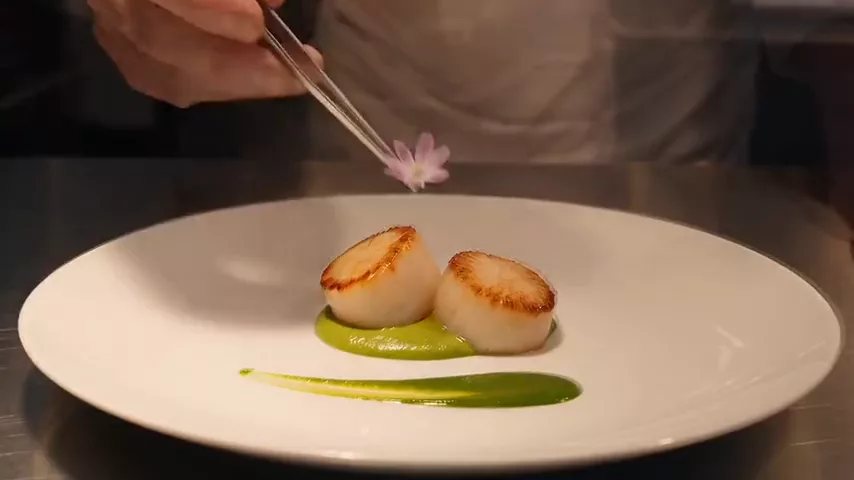
The model’s demo clip — a chef plating a dish: a close-up of hands, rising steam, then a wide shot of the kitchen — shows how Seedance 2.5 builds a multi-shot scene in one clip with warm light and smooth transitions.
Seedance 2.5 specifications
| Parameter | Value |
|---|---|
| Developer | ByteDance |
| Model type | Video generation with sound |
| Input modes | Text, image-to-video, reference-to-video |
| First and last frame | Supported |
| Photo references | Up to 9 |
| Duration | 4 to 30 seconds |
| Resolution | 480p, 720p, 1080p |
| Aspect ratios | 16:9, 9:16, 1:1, 4:3, 3:4, 21:9 |
| Sound | Generated with the video (on by default) |
| Price of a 4 s 720p clip | from $4.20 |
How to use Seedance 2.5 in WebTerra AI
- Sign up for WebTerra AI and top up your balance — the welcome bonus isn’t enough for this model.
- Open the video generator in your dashboard and choose Seedance 2.5.
- Pick a mode: text, photo animation (optionally with first and last frames) or reference-based generation (up to 9 images).
- Set the duration (4–30 s), resolution and aspect ratio. Sound is on by default.
- Write the prompt: what happens, how the camera moves, what is heard.
- Run the generation, review the clip and download the result.
How not to overpay
Seedance 2.5 is expensive, so test economically. Work out your prompt at 480p and a short duration: you’ll check the story, camera movement and sound for a fraction of the price. When everything works, render the final version at 720p or 1080p and full length. The same applies to references: first make sure the model has “recognized” your character correctly, then generate the long scene.
Other video models are on the AI video generation page.
Seedance 2.5 pricing
Cost of a 4-second 720p clip:
| Plan | Price in USD |
|---|---|
| Any plan or top-up pack | $4.20 |
Pricing is per second and depends heavily on resolution. Rates: about $0.47 per second at 480p, about $1.05 at 720p and about $2.63 at 1080p. For reference: 10 seconds at 480p is about $4.67, 5 seconds at 720p (the default) about $5.26, and 10 seconds at 720p about $10.50.
The free trial balance you get on sign-up is not enough for a Seedance 2.5 clip. It is best spent getting to know cheaper models — for example, generating a starting frame or a character reference to use in Seedance later. Top-up packs and terms are on the pricing page.
Seedance 2.5 prompt examples
Write prompts in English. Since the model generates sound, describe not only the picture but also what is heard.
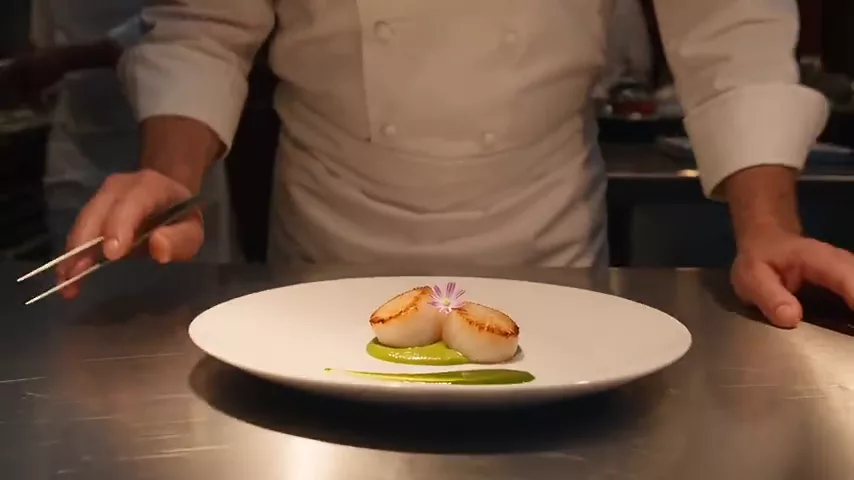
Demo prompt: a multi-shot scene
Cinematic multi-shot sequence: a chef plating a dish in a fine dining kitchen, close-up of hands, steam rising, then a wide shot of the kitchen, warm light, no text, no captions, no watermark
The prompt behind the demo clip: a close-up, then a wide shot — in one clip.
Character line with sound
Medium close-up of an elderly fisherman on a wooden pier at dawn, he looks at the camera and says calmly: "The sea always gives back what it takes." Soft waves, distant seagulls, warm low sun.
A short line in quotes plus ambient sounds.
Scene with ambient sound
A cozy bookstore on a rainy evening, camera slowly dollies past shelves toward a reading nook, rain tapping on the window, soft jazz from an old radio, pages turning, warm lamp light.
Sound is described alongside the visuals, and the model syncs them.
Product video
Premium perfume bottle on black marble, slow orbiting camera, light refracting through the glass, a single drop falls into water in slow motion, deep resonant chime on impact, elegant commercial style, no text.
An ad clip with a sound accent.
Emotional close-up
Close-up of a young woman reading a letter by the window, her eyes fill with tears and she smiles slowly, soft natural light, quiet room tone, paper rustling.
Facial expression and gaze — where a stable face matters most.
First-person vlog
POV handheld shot walking through a busy night market in Bangkok, sizzling street food stalls, vendors calling out, neon signs, slight camera shake as if filmed on a phone.
A lively POV shot with street sounds.
Tips for Seedance 2.5 prompts
Give sound its own sentence
The model generates audio with the video, so feed it material: “rain tapping on the window”, “distant traffic”, “soft piano”. For dialogue, put the line in quotes and keep it short — one or two sentences.
Build multi-shot scenes in order
Character consistency across shots is the model’s trump card. Use it: “close-up of…, then a wide shot of…, finally…”. Two shots are enough for 4–8 seconds; for 20–30 seconds you can plan three or four stages.
Use references for a recognizable hero
If a character must look the same across a series of clips, upload several photos of them from different angles in reference-to-video mode (up to 9 images). That is more reliable than describing their appearance in words every time.
Use first and last frames for a precise ending
When the final frame matters — say, a packshot of the product — set both the starting and ending images. The model will build the motion between them.
Add “no text, no watermark”
The model’s own demo prompt ends that way. It helps avoid random captions in the frame.
Be careful with real faces
The model sometimes rejects images with real faces. If an uploaded photo of a person doesn’t go through, try a generated character or an illustration as the reference.
Who Seedance 2.5 is for
- Ad production teams and agencies. Multi-shot clips with sound for campaigns, without a shoot.
- Brands with recurring characters. A mascot or hero that must look the same in every video.
- Serial content. Mini-series, storytelling and episodes for social media.
- E-commerce. Premium product videos ending on a packshot via first and last frame mode.
- Social media. Vertical clips with sound, ready to publish.
- Restaurants and hospitality. Atmospheric kitchen and plating scenes, just like the demo clip.
Seedance 2.5 vs. other video models

| Model | Feature | Choose it when |
|---|---|---|
| Seedance 2.5 | ByteDance flagship, up to 30 s with sound | Long multi-shot scenes, consistent characters, references |
| Seedance 2.0 | Audio + multi-scene | The previous generation, to compare results |
| Veo 3.1 | 4K, with sound | You need 4K resolution |
| Kling 2.6 Pro | Sound out of the box | An alternative with built-in sound |
| Kling 3.0 | Top motion quality | Motion comes first |
Seedance 2.0 is the previous generation of the same line, also with sound and multi-scene support. If 2.0’s results work for you, compare the cost — for some tasks it may be enough.
Veo 3.1 generates video with sound in 4K. Seedance 2.5 tops out at 1080p, so for big screens or a 4K edit, Veo is the logical candidate.
Kling 2.6 Pro also produces sound out of the box, while Kling 3.0 bets on motion quality. For dynamic scenes, compare both with Seedance on the same prompt. Seedance 2.5 wins when you need long duration, several shots and a recognizable hero.
Limitations of Seedance 2.5
- High price. Even the shortest clip costs several dollars, and 1080p is the most expensive tier.
- Real faces. The model sometimes rejects images of real people.
- Up to 1080p. No 4K output.
- 4 seconds minimum. Shorter clips aren’t available.
- The free trial balance isn’t enough. You’ll need to top up before the first generation.
Seedance 2.5 FAQ
What’s special about Seedance 2.5?
According to the model card, it is ByteDance’s flagship: character consistency across shots, synchronized sound and clips up to 30 seconds.
How much does a clip cost?
Four seconds at 720p cost $4.20. Longer clips and 1080p cost more; 480p costs less.
Does the model generate sound?
Yes, sound is generated together with the video and is on by default.
How many references can I upload?
Up to 9 photos in reference-to-video mode.
Can I set the first and last frame?
Yes, the model supports first and last frame mode.
Why was my photo rejected?
Seedance 2.5 sometimes rejects images with real faces. Try another photo, a generated character or an illustration.
Seedance 2.5 is the tool for when you need a finished video: several shots, a recognizable hero and sound in one clip of up to 30 seconds. Try Seedance 2.5 in WebTerra AI — start with a short 480p test and scale up the prompt that works.
Try AI models yourself
Models for video, images and audio in one place — a free trial balance when you sign up
Start for free