Kling 2.6 Pro Review: AI Video with Sound and Dialogue Built In
Kling 2.6 Pro generates video with sound and dialogue in one pass: stable physics, convincing close-ups, 5 or 10 seconds. Modes, pricing, prompts and how it compares to Veo.

Kling 2.6 Pro is a video model from Kuaishou that generates clips with sound already included: ambience, effects and lines spoken by characters. No separate sound hunt, no voiceover, no syncing an audio track — the model delivers a finished scene you can post right away. In this Kling 2.6 Pro review we cover what the model does, what a clip costs, how to use Kling 2.6 Pro online in WebTerra AI, and how to write prompts so picture and sound work together.
Kuaishou runs one of China's largest video platforms, and the Kling line has become one of the most talked-about AI video generators thanks to its realistic motion and physics. Version 2.6 Pro focuses on three things: sound out of the box, stable physics and convincing close-ups of people — facial expression, gaze and emotion.
It's a good fit for social media managers and creators who need short clips for Reels and Shorts, advertisers making product videos, and storytellers or screenwriters who want to see a scene with dialogue before anything is shot.
What Kling 2.6 Pro can do
- Video with sound from the start. Audio generation is on by default: the model creates ambience, effects and dialogue together with the picture.
- Dialogue and spoken lines. A character can say a line on camera — no separate voice model needed.
- Text to video. Describe a scene in words and the model builds it from scratch.
- Image to video. Upload a picture and the model animates it while keeping the composition and subject.
- First and last frame. Set how the clip starts and ends, and the model builds the transition between them.
- Stable physics. Objects, fabric, liquids and walking motion look natural, without wobbly distortions.
- Close-ups of people. Facial expressions, gaze and micro-movements are among the model's strengths.
- 5 or 10 seconds in three formats: 16:9, 9:16 and 1:1.
Kling 2.6 Pro specs
| Parameter | Value |
|---|---|
| Developer | Kuaishou |
| Type | Video generation with sound |
| Input modes | Text → video; image → video |
| First and last frame | Yes |
| Duration | 5 or 10 seconds |
| Aspect ratios | 16:9, 9:16, 1:1 |
| Audio | Generated with the video (on by default) |
| Prompt limit | 2,500 characters |
| Price per 5 s clip (Starter) | 114 credits, about $1.46 |
How to use Kling 2.6 Pro in WebTerra AI
- Sign up for WebTerra AI and top up your credit balance.
- Open the video generator in your dashboard and choose Kling 2.6 Pro.
- Pick a mode: describe the scene in text or upload a photo to animate. Set a first and last frame if you need that control.
- Choose duration (5 or 10 seconds) and format: 16:9 for YouTube, 9:16 for Reels and Shorts, 1:1 for feeds.
- Write the prompt: what happens, how the camera moves, what can be heard and what characters say. You can start from a preset such as "Cinematic shot", "Character line with sound" or "Emotional close-up".
- Check the cost and run the generation.
- Watch the result with sound and download the clip.
Other video models are collected on the AI video generation page.
Kling 2.6 Pro pricing
The prices below are for a clip at default settings: 5 seconds, 16:9, with sound. A 10-second clip costs more — the dashboard shows the exact amount before you run.
| Plan | Credits per 5 s clip | Price in USD |
|---|---|---|
| Starter | 114 | about $1.46 |
| Pro | 108 | about $1.30 |
| Ultra | 102 | about $1.18 |
A straight answer about the welcome bonus: the 60 credits you get on sign-up won't cover a Kling 2.6 Pro clip. They're useful for getting to know the platform on cheaper models — for example, generating a starting frame you can animate later. For Kling itself, pick a plan on the pricing page; each clip is cheaper on Pro and Ultra.
Kling 2.6 Pro prompt examples
Since the model generates sound, describe not only the picture but also what should be heard.
Cinematic scene (the model's demo)
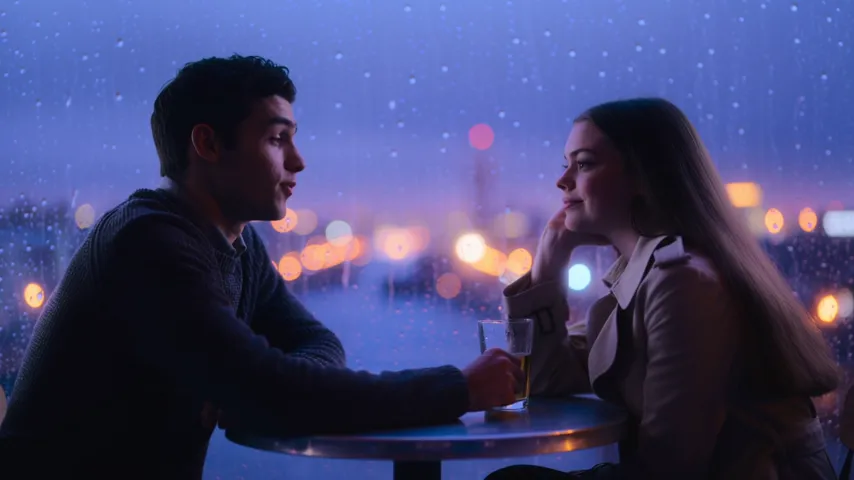
Film still in motion: two people talking at a cafe window on a rainy evening, city lights bokeh outside, indigo and violet palette, anamorphic lens, no text, no captions, no watermark
This is the exact prompt behind the demo clip: a conversation by a café window on a rainy evening, with city lights in bokeh.
Character line with sound
Close-up of a young barista behind the counter, she smiles and says: "Your coffee is ready!", soft café background noise, coffee machine hissing, warm morning light
A character speaks a short line while a lively café atmosphere plays around her.
Emotional close-up
Extreme close-up of an elderly man looking at an old photograph, his eyes slowly fill with tears, a faint smile, quiet room tone, distant clock ticking, soft window light
Facial expression and gaze — something the model renders especially well.
Product video
Slow orbit around a matte black wireless speaker on a concrete pedestal, soft studio light, subtle bass music starts playing from the speaker, clean premium look
An ad clip for a marketplace or social media, with sound that sells the product.
Scene with ambient sound
A lone hiker walking along a misty mountain ridge at sunrise, wind gusts, gravel crunching under boots, distant eagle cry, wide cinematic shot
Nature in motion, with sound described alongside the visuals.
First-person vlog
POV handheld phone shot walking through a busy night market, sizzling street food stalls, vendors calling out, lantern lights, natural shaky camera
A POV shot that looks phone-filmed — great for vertical formats.

Tips for prompting Kling 2.6 Pro
Describe the sound explicitly
The model creates audio on its own, but it helps to say what should be heard: "rain on the window", "crowd murmur", "engine roar". That gets you the intended atmosphere rather than a random background.
Keep lines short and quoted
One or two short phrases come out more reliably than a long monologue. Put the line in quotes and say who speaks it: "the woman says: ...".
One action per clip
Five or ten seconds is enough for one clear event. Don't cram a whole plot into a single clip — make several short scenes and cut them together.
Direct the camera in words
"Slow dolly in", "orbit", "handheld", "static wide shot" — camera movement strongly shapes how a shot feels.
For close-ups, describe the face
Convey emotion through concrete cues: "eyes narrow", "a slight smile", "tears well up". The model handles that kind of detail well.
Use first and last frames for control
When the start and end of a clip matter, set both frames. Handy for transitions, product reveals and transformations.
Use the prompt limit wisely
Prompts can run up to 2,500 characters, but longer isn't always better. A "scene — action — camera — light — sound" structure is more reliable than a wall of description.
Text, image or two frames: which mode to pick
Text to video is the fastest way to test an idea: you describe the scene and the model invents characters, location and motion. Great for atmospheric shots, concepts and cases where exact appearance doesn't matter.
Image to video is the choice when a specific look must be preserved: your product, a branded interior, a character you generated earlier. The model uses the image as the base and adds motion and sound. A handy pairing is to perfect a frame in an image model first, then bring it to life in Kling 2.6 Pro.
First and last frame gives maximum control. You set the starting point and the ending, and the model builds the transition — ideal for before-and-after, transformations, product reveals or smooth moves between two locations.
Building a clip from several scenes
- Break the story into 3–4 short 5-second scenes, each with a single action.
- For a consistent character, create starting frames in an image model and use image-to-video.
- Repeat the same lighting, palette and style description in every prompt so the scenes feel like one piece.
- Describe sound for each scene separately, and add music in the edit if needed.
- Cut the scenes together in your usual editor.
Use cases for Kling 2.6 Pro
- Social media and creators. Ready-to-post 9:16 clips for Reels, TikTok and Shorts — with sound.
- Ads and marketplaces. Product videos where sound amplifies the impression.
- Storytelling. Short dialogue scenes for social series, teasers and script previsualization.
- Food and lifestyle. Mouth-watering clips with sizzling, pouring and a lively background.
- Brands and agencies. Fast testing of creative ideas before production.
- Photo animation. Bringing shots of characters, products and locations to life.
Kling 2.6 Pro compared with other video models
| Model | Strength | Choose it when |
|---|---|---|
| Kling 2.6 Pro | Sound and dialogue built in, physics, close-ups | You need a finished clip with sound and people on screen |
| Veo 3.1 | 4K, with sound | Maximum resolution matters |
| Veo 3.1 Lite | Budget Veo, 1080p | You want to save on short clips |
| Seedance 2.0 | Audio + multi-scene | You need several scenes in one clip |
| Kling 2.5 Turbo Pro | Up to 10 s, realistic | No sound needed, realistic motion is the priority |
Honestly, Kling 2.6 Pro isn't the cheapest option, and if you'll be adding sound in the edit anyway, models without audio are worth a look. For higher resolution go with Veo 3.1; on a tight budget, Veo 3.1 Lite. But when you want a scene with people, emotion and live sound in a single run, Kling 2.6 Pro is a strong candidate.
Limitations
- 5 or 10 seconds. Longer videos have to be assembled from several generations.
- Three formats. 16:9, 9:16 and 1:1 are available — no other ratios.
- Price. From 102 credits per 5-second clip; the welcome credits don't cover one generation.
- 2,500-character prompt. Complex scenes need a compact description.
- Dialogue. Long monologues and complex exchanges are less reliable than short lines. Check pronunciation before publishing.
FAQ
Does Kling 2.6 Pro generate sound?
Yes. Sound and dialogue are generated together with the video and are on by default.
How long are the clips?
5 or 10 seconds.
How much does one clip cost?
A 5-second clip with sound costs 102–114 credits depending on your plan, roughly $1.18–$1.46.
Can it animate a photo?
Yes. Image-to-video is supported, along with first and last frame control.
Which formats are available?
16:9, 9:16 and 1:1 — for YouTube, Reels and feeds.
Are the free credits enough?
No. 60 credits is less than one clip. Use them on cheaper models and choose a plan for Kling 2.6 Pro.
Kling 2.6 Pro gets you a finished scene with motion, emotion and sound in a single run. Open the WebTerra AI video generator, describe the scene along with its sound, and watch it come alive.
Try AI models yourself
Models for video, images and audio in one place — 60 credits free when you sign up
Start for free