Imagen 4 Ultra Review: Google’s Photorealistic Image Model Tested
A hands-on look at Google’s Imagen 4 Ultra: photorealism, fine detail and clean lettering, supported formats, price per image, ready-made prompts and comparisons with other models.
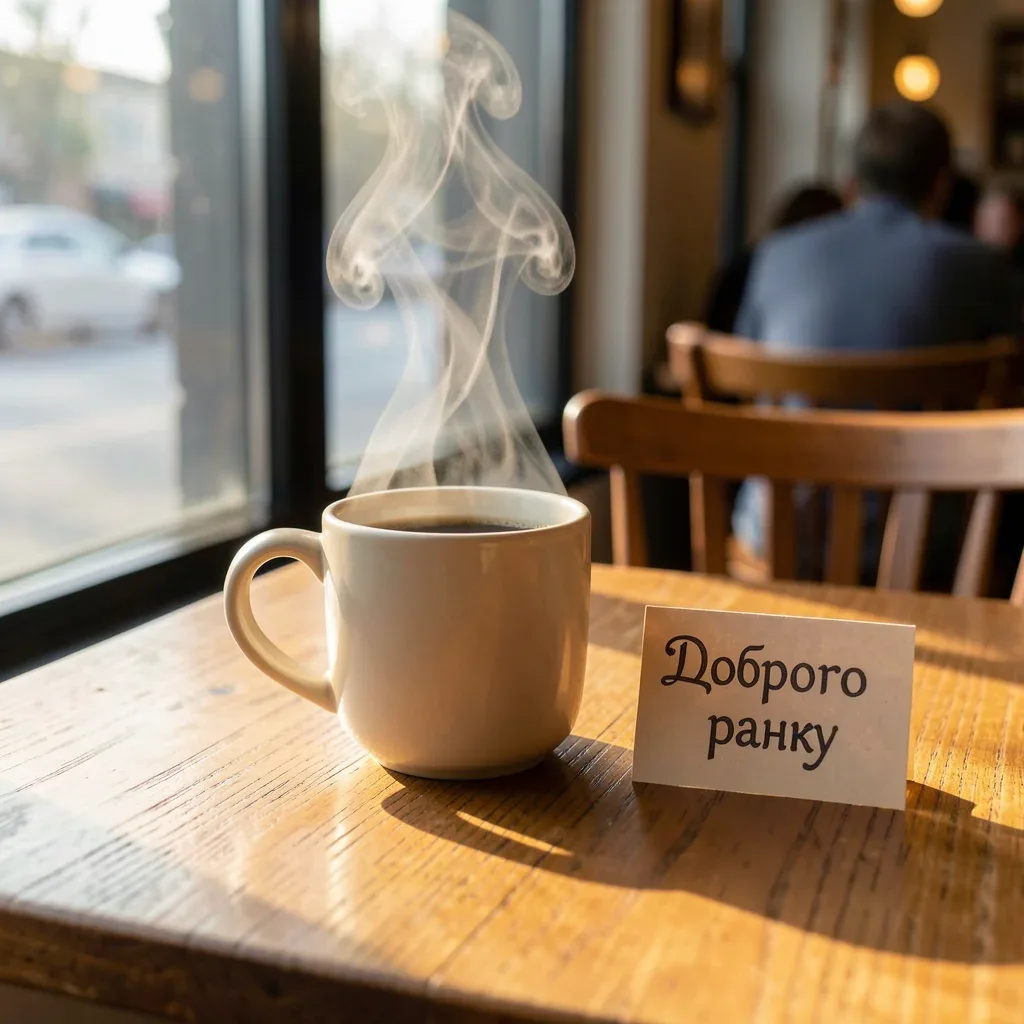
Imagen 4 Ultra is the top model of Google’s Imagen 4 line, built for photorealistic images with rich detail, clean text inside the frame and close prompt following. In this Imagen 4 Ultra review we look at what the model can do, which formats it supports, what one image costs, and how to use Imagen 4 Ultra online in WebTerra AI without fiddling with settings.
Google has been working on generative models for years, and Imagen is its family of text-to-image models. The Ultra version sits at the top of the Imagen 4 line and focuses on quality: it tries to honor every part of the description, from the texture of a material to the words on a sign. It doesn’t edit existing photos or accept reference images — it creates each picture from scratch based on your text, and it does so in a predictable, tidy way.
Imagen 4 Ultra is a good match for social media managers and marketers who need realistic creatives, online sellers who want product shots without a studio, bloggers who need article illustrations, and small businesses such as cafes, restaurants and shops that want a polished image with a short caption. Another practical plus is the fixed price per image: you always know in advance how much a generation will cost.
What Imagen 4 Ultra can do
The model has one mode: generating an image from text. You describe the scene, and Imagen 4 Ultra returns a single picture of roughly one megapixel. Its main strengths:
- Photorealism. Light, shadows, depth of field and the texture of wood, ceramics, fabric or skin look natural, much like a shot from a good camera.
- Fine detail. The model carefully renders small elements: steam over a cup, droplets on glass, coffee beans, the knit of a sweater.
- Text in the frame. Short lettering on signs, labels, posters and packaging comes out legible. In our test it even rendered a Ukrainian phrase in Cyrillic correctly.
- Close prompt following. Object placement, colors, mood and photographic style usually match what you wrote rather than the model’s own interpretation.
- Five aspect ratios. The model supports 1:1, 16:9, 9:16, 4:3 and 3:4 — from a square feed post to a vertical story.
- Long prompts. A description can be up to 5,000 characters, which leaves plenty of room for a complex scene with many conditions.
In terms of genres the model is versatile: cinematic portraits, product photography, landscapes, food shots, interiors, fashion looks, posters with text and simple labeled diagrams. It shines brightest where realism and clean detail matter most.
Imagen 4 Ultra specs
| Parameter | Value |
|---|---|
| Developer | |
| Type | Image generation |
| Input mode | Text → image only (no references, no editing) |
| Resolution | about 1 megapixel |
| Aspect ratios | 1:1, 16:9, 9:16, 4:3, 3:4 |
| Size presets in WebTerra AI | Square 1024 (1:1), Landscape 1344×768 (16:9), Portrait 768×1344 (9:16) |
| Prompt limit | up to 5,000 characters |
| Generation time | about 10 seconds in our test |
| Price per image | $0.20 |
How to use Imagen 4 Ultra in WebTerra AI
- Sign up for WebTerra AI — you’ll get a free trial balance right away.
- Open the image generator in your dashboard and choose Imagen 4 Ultra.
- Write a prompt: what’s in the frame, where the scene takes place, the lighting and the style. Put any text that should appear in the image inside quotes.
- Optionally pick a preset: cinematic portrait, product shot, food photography, interior, poster with text and others.
- Choose a size: Square 1024, Landscape (1344×768) or Portrait (768×1344).
- Check the price and start the generation. The result is usually ready within seconds.
- Review and download the image. If something is off, refine the prompt and run it again.
The Wide (21:9) and Poster (2:3) presets aren’t supported by this model, and neither are sizes above roughly one megapixel. The service checks the format before charging and asks you to pick another one, so you can’t lose money by accident. And if a generation fails for any reason, the money is refunded to your balance automatically.
All other image models are collected on the AI image generation page — handy if you want to compare several options on the same prompt.
Imagen 4 Ultra pricing
WebTerra AI charges generations to your balance. Imagen 4 Ultra pricing is a flat rate per image that doesn’t depend on the length of your prompt.
| Plan | Price per image |
|---|---|
| Any plan or top-up pack | $0.20 |
Imagen 4 Ultra opens up after your first top-up: the trial covers lower-cost models, and that is where the free trial balance goes. Compare all plans and the balance each one adds on the pricing page.
Imagen 4 Ultra prompt examples
Write prompts in English for the most precise results; the lettering itself can be in another language. Here is the prompt we used to test the model:
Product photo of a ceramic coffee cup on a wooden cafe table by the window, morning light, steam rising, a small paper sign next to it that reads "Доброго ранку", shallow depth of field, photorealistic
The result was a photorealistic shot with soft morning light, steam above the cup and the Ukrainian phrase “Доброго ранку” (“Good morning”) spelled correctly on the paper sign. Generation took about 10 seconds.
Product shot
Product photo of a glass jar of wildflower honey on a light linen tablecloth, a wooden honey dipper and a few daisies nearby, soft daylight from the left, clean commercial look, photorealistic
A tidy product image for a marketplace listing or an online store.
Food photography
Top-down food photography of a bowl of ramen with a soft-boiled egg, sliced pork and spring onions, dark stone table, chopsticks on the side, warm natural light, appetizing, high detail
An appetizing dish for a menu, a delivery app or a restaurant’s Instagram.
Cinematic portrait
Cinematic portrait of an elderly fisherman in a knitted sweater at dawn, soft golden side light, light fog over the river behind him, shallow depth of field, film still look
A dramatic portrait with film-style lighting — a good test of how the model handles skin, fabric and atmosphere.
Poster with text
A vintage travel poster of a mountain lake at sunset, layered blue and orange hills, large bold title "ALPINE SUMMER" at the top, small text "Since 1952" at the bottom, clean retro typography
A poster with a headline and a smaller line. For a vertical version, choose the Portrait size.
Interior
Interior photo of a cozy Scandinavian living room, light oak floor, beige sofa, large window with a view of a snowy garden, warm lamp light, photorealistic, wide angle
A designer-style space for an interior studio, a property listing or a mood board. The Landscape size works well here.
Tips for prompting Imagen 4 Ultra
Describe the scene like a photographer
Since the model is strong at photorealism, speak its language: shot type (close-up, top-down, wide shot), light source and direction, depth of field, mood. Phrases like “soft morning light from the window” or “shallow depth of field” noticeably shape the result.
Go from the main subject to the details
Start with the main subject, then the setting, then lighting and style, and finish with text and small details. This order helps the model keep track of every condition, even in a long description.
Keep lettering short and quoted
Put text in quotes and say where it goes: “on a paper sign”, “at the top of the poster”, “on the label”. Two or three words come out most reliably. Long sentences in small type should be checked carefully or added later in an editor.
Pick the format before you generate
Composition depends on the aspect ratio. Use Square for feeds and marketplaces, Landscape for banners and covers, Portrait for stories and vertical posters. You can’t extend a square image into a wide one later, because the model doesn’t edit existing pictures.
Refine instead of rewriting
If a result is almost there, change one or two details: a different color, different light, a closer framing. That makes it easier to see what actually affects the image and get to the version you want faster.
Use cases for Imagen 4 Ultra
- Social media and advertising. Realistic creatives for posts, stories and banners, including ones with a short caption.
- Marketplaces and online stores. Product shots in any setting without booking a photo studio.
- Cafes and restaurants. Food photos for menus, delivery apps and social media, plus signs and promo visuals.
- Blogs and media. Covers and article illustrations that look like real photographs.
- Interior design and real estate. Room concepts and mood boards to show clients.
- Fashion. Magazine-style looks for presentations and lookbooks.
Imagen 4 Ultra compared with other models
| Model | Strength | Choose it when |
|---|---|---|
| Imagen 4 Ultra | Photorealism, detail, text in the frame | You need a realistic photo with a caption at a fixed price |
| FLUX.2 Pro | Photorealism, portraits | You want a second take on photographic portraits |
| FLUX 1.1 Pro Ultra | 4 MP, no upscaling | You need more than one megapixel |
| Nano Banana 2 | 4K, text in images | You need 4K output or want to work with existing images |
| Ideogram V3 | Posters and flyers | Typography is the core of the layout |
An honest take: Imagen 4 Ultra is a balanced choice when you need realism, clean detail and a legible short caption, with a predictable cost per image. But it only works from text and outputs about one megapixel. If you need a large file for print, look at FLUX 1.1 Pro Ultra or Nano Banana 2. If you want to modify an existing photo or use a reference, pick a model with an editing mode. For layouts where the text matters more than the picture, try Ideogram V3, and for portraits it’s worth comparing the result with FLUX.2 Pro on the same prompt.
Limitations
- Text-to-image only. The model doesn’t accept reference images and can’t edit uploaded photos.
- About one megapixel. Larger sizes aren’t supported; for big prints you’ll need another model or an upscaler.
- Five formats. 1:1, 16:9, 9:16, 4:3 and 3:4 are available. The Wide (21:9) and Poster (2:3) presets don’t work, and the service tells you so before you are charged.
- Prompts up to 5,000 characters. That’s more than enough, but very long descriptions work better when structured.
- Small text. Short captions come out clean; long paragraphs in fine print should be proofread.
- Not always right the first time. Like any generative model, Imagen 4 Ultra sometimes reads a prompt its own way — refining the prompt helps.
FAQ
Can Imagen 4 Ultra render text in languages other than English?
In our test it rendered the Ukrainian phrase “Доброго ранку” in Cyrillic correctly on a paper sign. Short phrases in quotes work most reliably.
How much does one image cost?
$0.20. The price is fixed and doesn’t depend on the prompt.
Can I upload my own photo to edit?
No, Imagen 4 Ultra works from a text description only. For photo editing, choose a model in the dashboard that accepts uploaded images.
Which sizes are supported?
About one megapixel in 1:1, 16:9, 9:16, 4:3 and 3:4. In the WebTerra AI form, the Square 1024, Landscape 1344×768 and Portrait 768×1344 presets work.
What happens if a generation fails?
The money is refunded to your balance automatically. An unsupported format is rejected before you are charged.
How many images can I make for free?
This model opens up after your first top-up. You can spend the free trial balance on the lower-cost models in the trial.
Imagen 4 Ultra by Google is the model for realistic images with clean detail and a legible caption at a transparent price. Open the WebTerra AI image generator, top up your balance and test it on a task of your own.
Try AI models yourself
Models for video, images and audio in one place — a free trial balance when you sign up
Start for free