Seedance 1.5 Pro Review: Complex Camera Moves and Sound in One Clip
Seedance 1.5 Pro by ByteDance handles complex camera moves, follows prompts closely and generates sound together with the picture. Modes, resolutions, per-second pricing and prompts.
Seedance 1.5 Pro is a video generation model by ByteDance whose strengths are complex camera moves, precise prompt following and sound generated in the same pass as the picture. Clips run from 4 to 12 seconds at 480p, 720p or 1080p, with six aspect ratios and a first-and-last-frame mode. In this Seedance 1.5 Pro review we cover what the model can do, Seedance 1.5 Pro pricing, how to use Seedance 1.5 Pro online in WebTerra AI and which prompts work best.
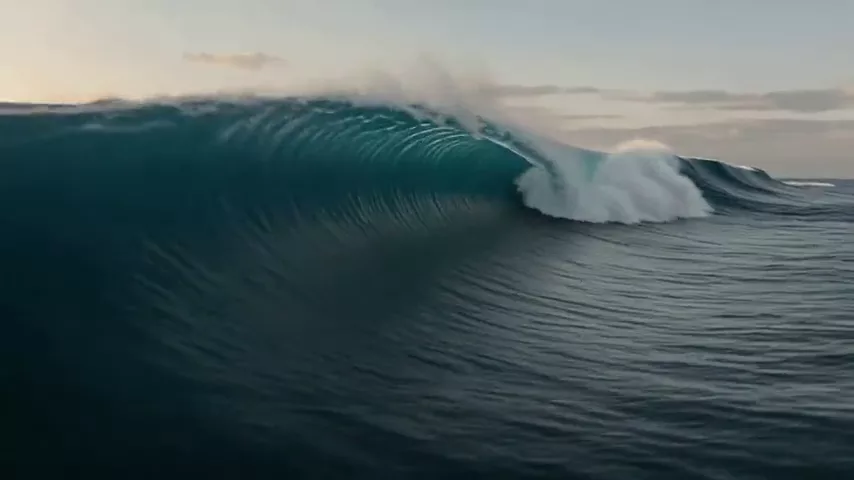
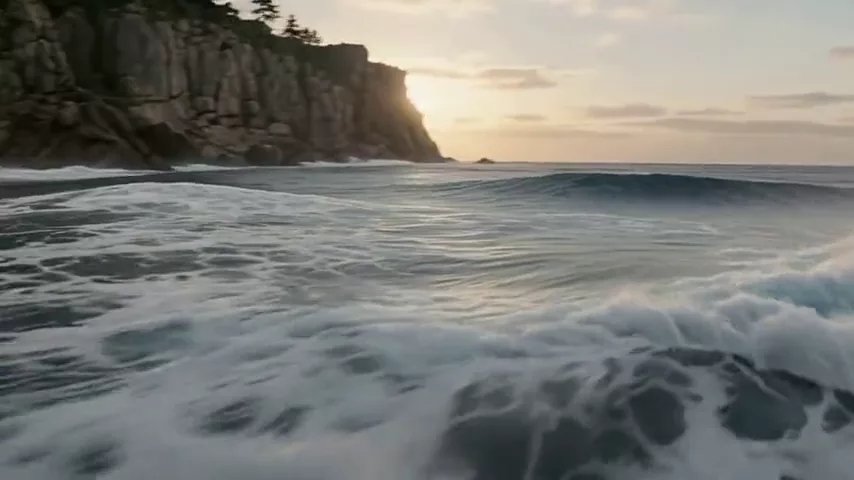
ByteDance is a technology company investing heavily in generative models, and Seedance is its video line. In the WebTerra AI catalog, version 1.5 Pro is summed up in three words: dynamics, camera and audio. The model’s demo clip — an FPV drone flying low over the waves toward a rocky shore at sunrise — shows what it is built for: fast, complex, cinematographer-style movement.
Who is it for? Makers of ads and promos who need eye-catching flyovers, social media managers creating dynamic Reels, travel and real estate content creators, and anyone who wants a clip with sound without a separate audio step.
What Seedance 1.5 Pro can do
The model has two main modes plus several extra capabilities:
- Text to video. Describe the scene, the camera move and the sound, and the model generates the clip.
- Image to video. Upload an image and the model builds a scene from it.
- First and last frame. Set the image the clip starts with and the one it ends on — the model builds the transition between them.
- Complex camera moves. Flyovers, orbits around an object, tracking shots, FPV style.
- Precise prompt following. The model pays close attention to the details in your prompt, so a detailed description pays off.
- Sound in a single generation. Ambient sound or a character’s line can be described in the prompt alongside the visuals.
- Flexible settings. Duration from 4 to 12 seconds in one-second steps, three resolutions and six aspect ratios.
By default the model generates a 5-second clip at 720p in 16:9 — a balanced choice for most tasks.
Seedance 1.5 Pro specs
| Parameter | Value |
|---|---|
| Developer | ByteDance |
| Type | Video generation with sound |
| Input modes | Text; image → video; first and last frame |
| Duration | 4–12 seconds (5 by default) |
| Resolution | 480p, 720p (default), 1080p |
| Aspect ratios | 16:9, 9:16, 1:1, 4:3, 3:4, 21:9 |
| Base cost per second | 480p — $0.04; 720p — $0.10; 1080p — $0.22 |
| Price per generation | $0.33–$0.38 for 4 seconds at 720p |
How to use Seedance 1.5 Pro in WebTerra AI
- Sign up — new accounts get a free trial balance.
- Open the video generator in your dashboard and select Seedance 1.5 Pro.
- Choose a mode: text, image, or first and last frame.
- Write your prompt: scene, camera move, atmosphere, sound. You can start from the Complex camera move or Scene with ambient sound preset.
- Set duration (4–12 s), resolution and aspect ratio: 9:16 for Reels and Shorts, 16:9 for YouTube, 21:9 for a cinematic look.
- Check the cost and start the generation.
- Review the result, download it or refine the description for the next take.
Compare Seedance 1.5 Pro with other video models on the AI video generation page.
Seedance 1.5 Pro pricing
Cost depends on duration and resolution. Here is the price of a 4-second 720p clip on each plan:
| Plan | Price for 4 s, 720p |
|---|---|
| Starter | $0.38 |
| Pro | $0.36 |
| Ultra | $0.33 |
For other settings, use the base cost per second: 3.75 credits at 480p, 8.66 at 720p and 19.66 at 1080p (plans with a discount charge slightly less). The gap between 480p and 1080p is more than fivefold, so choose resolution deliberately. Here is a budgeting guide at the base rate (before plan discount; the dashboard shows the exact amount before you start):
| Clip | 480p | 720p | 1080p |
|---|---|---|---|
| 5 seconds | ≈ 19 cr. | ≈ 43 cr. | ≈ 98 cr. |
| 8 seconds | ≈ 30 cr. | ≈ 69 cr. | ≈ 157 cr. |
| 12 seconds | ≈ 45 cr. | ≈ 104 cr. | ≈ 236 cr. |
The practical takeaway: for Reels and Stories watched on a phone, 720p is usually enough; save 1080p for final ads and big-screen playback. The free trial balance covers one 4-second 720p clip or several short 480p drafts. Top-up packs are on the pricing page.
Seedance 1.5 Pro prompt examples
The first prompt comes from the model’s own demo clip.
FPV flight over the sea
Dynamic FPV drone shot flying low over ocean waves towards a rocky cliff at sunrise, fast camera movement, spray in the air, no text, no captions, no watermark
The demo prompt: a fast, low flight, spray and sunrise — showcasing the model’s dynamic camera.
Product orbit
Slow 360-degree orbit around a luxury perfume bottle on a black glossy pedestal, soft studio light with golden highlights, subtle reflections, elegant ambient music
A product video for a marketplace or ad: a circular move and background music in one generation.
Tracking shot
Tracking shot following a cyclist from behind through a narrow old-town street at golden hour, camera low to the ground, sound of tires on cobblestones and distant church bells
The camera follows the subject, with sound described alongside the visuals.
Character line with sound
Medium shot of a barista behind the counter looking at the camera and saying with a smile: "Your coffee is ready!", café ambience with soft chatter and the hiss of a milk steamer
A short spoken line plus café ambience — for models that generate their own audio.
City flyover
Aerial flyover above a modern city at blue hour, camera gliding between glass skyscrapers, lights turning on in the windows, cinematic, deep ambient city hum
A cinematic flyover for a travel or corporate video — try it in 21:9.
Fantasy reveal
Camera rises slowly from a misty forest floor to reveal a giant glowing tree in the center of an ancient valley, fireflies in the air, epic orchestral swell, fantasy film style
A fantasy scene with a rising camera and a described musical mood.
Tips for writing Seedance 1.5 Pro prompts
Name the camera move
“FPV drone shot”, “slow orbit”, “tracking shot from behind”, “camera rises”, “push-in”, “flyover” — the model understands cinematography terms well. A specific move beats a vague “dynamic camera”.
Describe sound as its own block
Since sound is generated with the picture, finish your prompt with what should be heard: waves, footsteps, city hum, a spoken line. Put dialogue in quotation marks.
Be detailed — the model rewards it
Seedance 1.5 Pro follows descriptions closely, so specify time of day, weather, materials, colors and speed of movement. Just avoid contradictory requirements.
Use first and last frame for controlled transitions
When a clip should start in one state and end in another — a closed bud becoming a flower, an empty room becoming a furnished interior — upload both frames for a predictable trajectory.
Draft in 480p, finish in higher quality
Explore composition and movement with cheap 480p clips, then render the final version at 720p or 1080p once the scene works.
Match aspect ratio to the platform
9:16 for Reels, Shorts and Stories; 1:1 and 4:3 for feeds; 16:9 for YouTube and websites; 21:9 for a cinematic look.
Ideas for first-and-last-frame mode
First-and-last-frame mode is one of the model’s most practical features, because it gives you control over how a clip ends. A few scenarios where it shines:
- Before and after. An empty room at the start, a furnished interior at the end — great for designers, renovation crews and furniture stores.
- Unboxing. A closed box becomes the product on the table — a short, punchy marketplace clip.
- Change of season or time of day. The same landscape by day and by night, in summer and in winter.
- Logo ending. The clip starts with a scene and ends on your logo or packaging — a ready-made ad outro.
Keep both frames in the same style and aspect ratio for a smooth transition, and briefly describe in the prompt what happens between them and how the camera moves.
Who Seedance 1.5 Pro is for
- Ads and promos. Striking flyovers, product orbits and dynamic intros.
- Social media. Vertical clips with motion and sound for Reels and Shorts.
- Marketplaces. Rotating product videos with music.
- Travel and real estate. Flyovers of locations and interior walkthroughs.
- Music videos and short films. Cinematic 21:9 shots.
- Food content. Mouth-watering close-ups for menus and Reels.
Seedance 1.5 Pro vs other video models
| Model | Profile | When to choose it |
|---|---|---|
| Seedance 1.5 Pro | Dynamics, camera, sound, 4–12 s | Complex camera moves and sound in one generation |
| Seedance 2.0 | Audio + multi-scene | Several scenes in one clip |
| Kling 3.0 | Top motion quality | Maximum motion quality in the frame |
| Kling 2.6 Pro | Sound out of the box | An alternative with built-in audio |
| Veo 3.1 Lite | Budget Veo, 1080p | An affordable 1080p clip |
Pick Seedance 1.5 Pro when you want cinematographer-style moves, flexible settings and sound without a separate step. If your clip needs several scenes, read our Seedance 2.0 review. For the highest motion quality, compare with Kling 3.0, and for another option with sound out of the box, with Kling 2.6 Pro. On a tight budget but need 1080p? Try Veo 3.1 Lite. For clips centered on human emotion, the catalog also has Hailuo 2.3.
Seedance 1.5 Pro limitations
- Up to 12 seconds. Longer videos must be assembled from several generations.
- 1080p costs noticeably more. The base per-second rate at 1080p is more than double that of 720p.
- Sound depends on your description. If you do not say what should be heard, the result may not match your expectations.
- Complex scenes need iteration. Fast camera moves plus many objects — plan for a few takes.
- Ethics. Do not create misleading clips of real people, and respect the rights to any images you upload.
FAQ
How much does a Seedance 1.5 Pro clip cost?
4 seconds at 720p costs 34 credits on Starter (about $0.44), 32 on Pro (about $0.39) and 30 on Ultra (about $0.35). Other durations and resolutions change the price.
Does the model generate sound?
Yes, sound is created in the same generation as the video. Describe it in your prompt.
What are the maximum duration and resolution?
Up to 12 seconds and up to 1080p.
Which aspect ratios are available?
16:9, 9:16, 1:1, 4:3, 3:4 and 21:9.
What is first-and-last-frame mode?
You upload a starting and an ending image, and the model generates a smooth transition between them.
Is the free trial balance enough?
60 credits cover one 4-second 720p clip or several 480p drafts.
Seedance 1.5 Pro is a flexible tool for striking clips with complex camera work and sound in a single generation. Claim your 60 free credits and generate your first flyover in WebTerra AI.
Try AI models yourself
Models for video, images and audio in one place — a free trial balance when you sign up
Start for free