Generating music and songs
Tracks with and without vocals: lyrics, instrumentals and how the price works.
Music models are in “Voice & music” in the menu: Suno V6, MiniMax Music 2.6, ElevenLabs Music, Lyria 3 Pro, Stable Audio 2.5, Sonilo Music 1.1. The “Pick by task:” row has quick buttons “🎤 Song with vocals” and “🎼 Instrumental music”.
A song with vocals
- Choose a model (1 in the screenshot) — Suno V6 or MiniMax Music 2.6.
- In the “Style and mood” field, describe the genre, mood and tempo, for example: “Indie folk, melodic, autumn evening, acoustic guitar, 90 BPM”.
- Optionally paste your own words into the “Lyrics” field (2) — up to 2000 characters, with [Verse] and [Chorus] tags if you like. Without lyrics, Suno V6 writes the words itself.
- Click “Generate” (3).
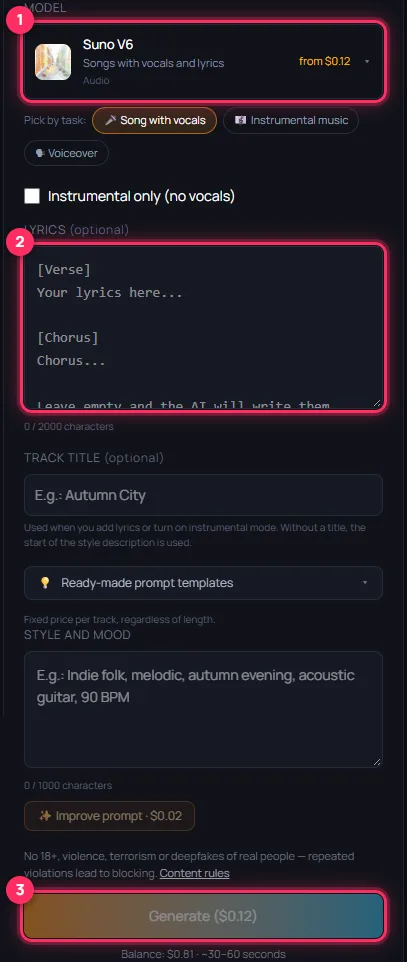
Need a melody without a voice? Turn on “Instrumental only (no vocals)”. Suno V6 also has a “Track title” field: it is used when you add lyrics or turn on instrumental mode.
Background music and soundtracks
ElevenLabs Music, Lyria 3 Pro and Stable Audio 2.5 work well for background music for videos and loops.
How the price works
- some models charge a fixed price per track;
- for per-second models the track length isn’t known in advance, so an advance for ~30 seconds is charged first, and the amount is recalculated from the actual length after generation — the form warns you about this.
You can lay the finished track over a video with “Audio merge”.