Text-to-speech
ElevenLabs voices in English and Ukrainian: choosing a voice, limits and price.
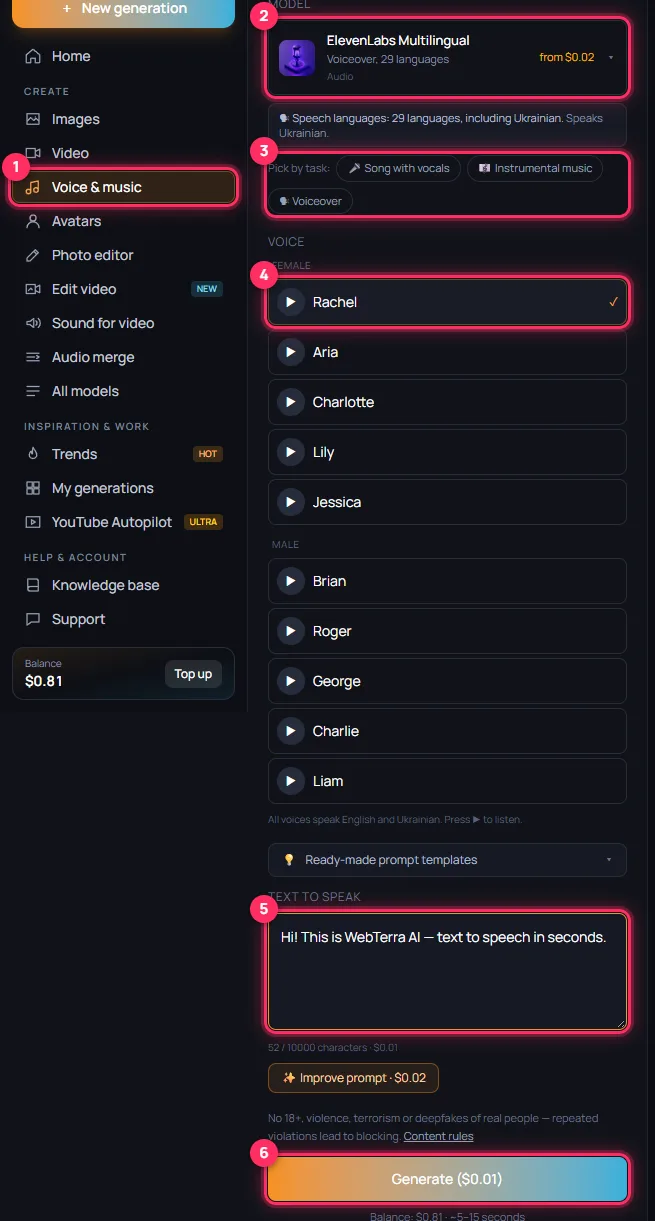
Open “Voice & music” in the menu (1 in the screenshot) and choose a voice model (2): ElevenLabs Multilingual, ElevenLabs v3 or ElevenLabs Turbo. The “🗣 Voiceover” button in the “Pick by task:” row (3) selects ElevenLabs v3 right away.
- Choose a voice (4) — there are 13: 5 female and 8 male. Each has a ▶ button so you can listen to a sample before running.
- Paste your text into the “Text to speak” field (5) — up to 10000 characters (ElevenLabs v3 allows less; the form shows the limit).
- Click “Generate” (6) — the price on the button updates as you type.
Languages
All voices speak English and Ukrainian. ElevenLabs Multilingual supports 29 languages.
Price
Voice-over is priced by character count: $0.02 per 100 characters in ElevenLabs Multilingual. ElevenLabs Turbo is the budget option, ElevenLabs v3 has more expressive emotions.
The “Narrator” voice is a deep, calm voice of an older storyteller for fairy tales, stories and documentaries. It speaks Ukrainian, English, Polish and other languages, and its price is the same in all three models — $0.12 per 1000 characters.