Payment methods and currencies
Visa, Mastercard, Apple Pay, Google Pay and crypto. Cards are charged in hryvnias, crypto in US dollars.
You can pay for a plan or top up your balance by card, with your phone wallet or with cryptocurrency:
- Visa and Mastercard cards;
- Apple Pay;
- Google Pay;
- cryptocurrency — USDT, USDC, BTC, ETH, TON and other coins (via NOWPayments, priced in US dollars).
Card payments are processed by the monobank payment service. The pay button in your dashboard opens its secure page, where you choose a method, and after payment you return to the dashboard. The same methods work for 1-, 6- and 12-month plans and for one-time top-ups.
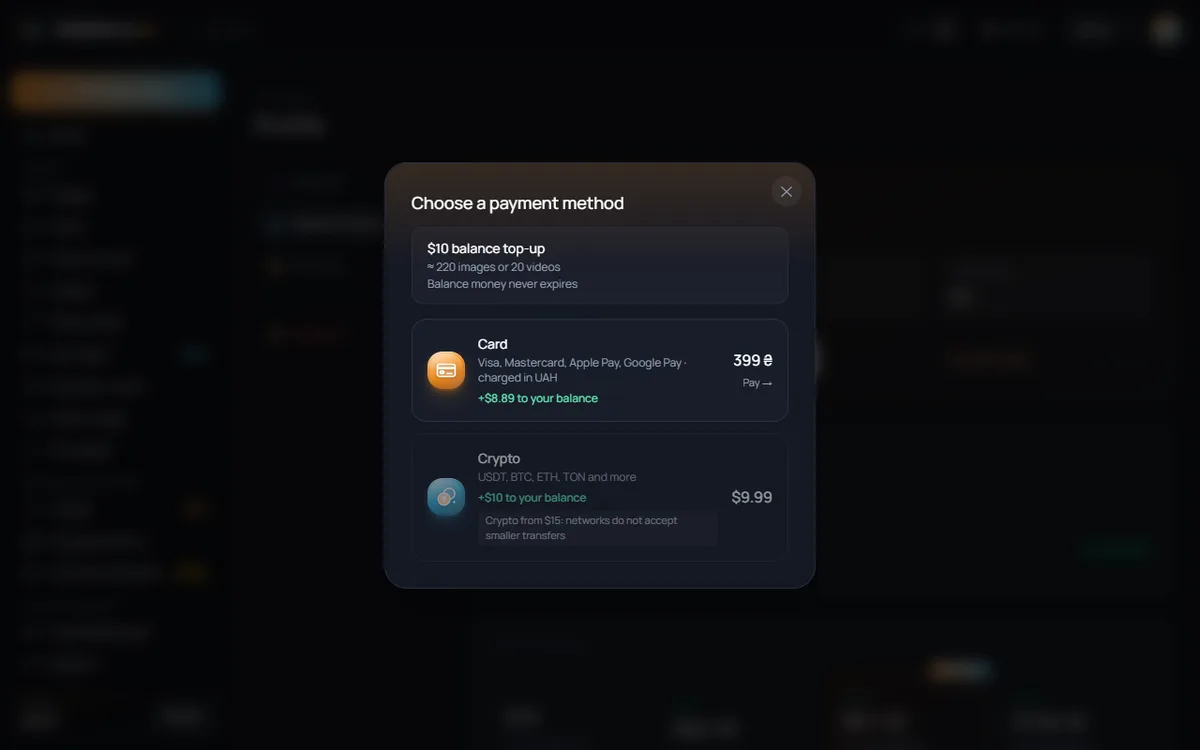
You pick the method in the “Choose a payment method” window that appears after you click a pay button: “Card” is charged in hryvnias, “Crypto” in US dollars.
Which currency prices are in
Prices and your balance are in US dollars ($) on the English site and in Ukrainian hryvnias (₴) on the Ukrainian one. Card payments are always charged in hryvnias, on the English site too: the payment window shows the price in ₴, and if your card is in another currency, your bank converts the amount. A crypto invoice is always in US dollars. You can switch the language in the site header or footer, and in the dashboard under Settings → Account.
Fees
We don’t add any fees to the price. Your card issuer may charge its own fee — for example, for currency conversion if your card currency differs from the payment currency.
You can also pay with cryptocurrency (USDT, BTC, ETH and more) — see Paying with crypto.