Wan 2.7 Review: Alibaba’s Open-Source, Affordable Video Model
Wan 2.7 is Alibaba’s open-source video model: affordable, good quality, first/last frame support, 720p or 1080p and five aspect ratios. Features, pricing and prompts.

Wan 2.7 is an open-source video generation model from Alibaba. It combines an affordable price, good quality and first/last frame support, and it produces clips from 3 to 15 seconds at 720p or 1080p. In this Wan 2.7 review we look at how it works, how to use it online in WebTerra AI, what a second of video costs and who it suits best.
The WebTerra AI catalog sums it up in three words: "open source, affordable". It's a model for people who need a lot of video on a moderate budget — social media managers, small business owners, content creators, real estate agencies that want video tours, and anyone just starting with AI video who doesn't want to burn through their budget on day one.
Its key functional advantage is first and last frame control. You set the image the clip starts on and the one it ends on, and the model builds the motion in between. That's a level of control many video models lack: you can plan a transition, a transformation or a camera move precisely.
What Wan 2.7 can do
- Text to video. Describe a scene and get a clip.
- Image to video. Bring a photo or a generated frame to life.
- First and last frame. Define the start and end of the clip with two images.
- 3 to 15 seconds in one-second steps.
- Two resolutions. 720p for drafts and social, 1080p for final cuts.
- Five aspect ratios. 16:9, 9:16, 1:1, 4:3 and 3:4 — more than many video models offer.
The dashboard default is a 5-second clip at 720p in 16:9.
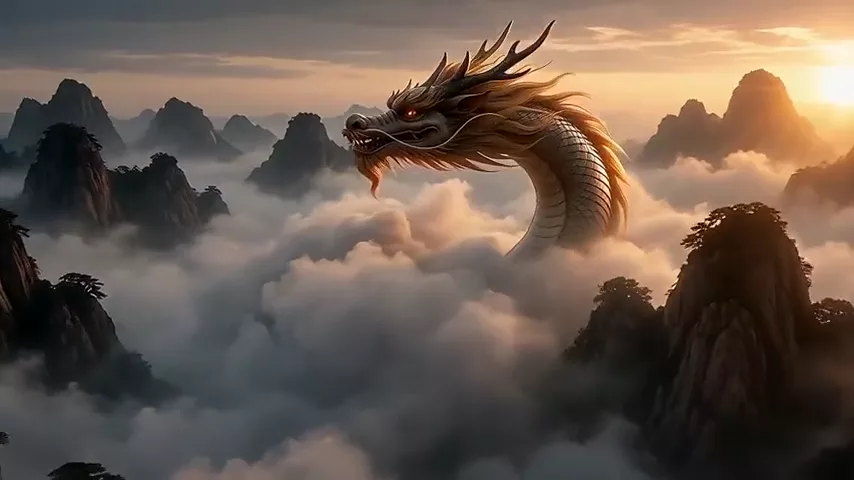
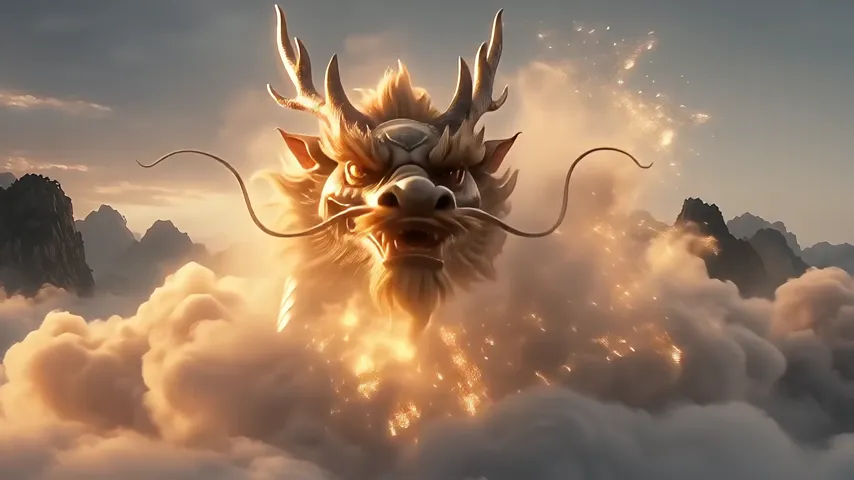
The model's demo shows a dragon emerging from the clouds at sunset over misty mountains — an epic wide shot in the style of Chinese fantasy cinema. It shows that Wan 2.7 handles large-scale scenes, atmospheric light and big objects in motion.
Wan 2.7 specs
| Parameter | Value |
|---|---|
| Developer | Alibaba |
| Model type | Video generation, open source |
| Modes | Text to video, image to video, first and last frame |
| Duration | 3 to 15 seconds |
| Resolution | 720p, 1080p |
| Aspect ratios | 16:9, 9:16, 1:1, 4:3, 3:4 |
| Base cost per second | $0.27 (720p), about $0.40 (1080p) |
| Price of a 3-second clip | from $0.80 |
How to use Wan 2.7 in WebTerra AI
- Sign up for WebTerra AI and get a free trial balance.
- Open the video generator in your dashboard and select Wan 2.7.
- Choose a mode: text description, a starting image, or a first/last frame pair.
- Write the prompt: subject, action, camera movement, light and atmosphere.
- Set duration, resolution (720p or 1080p) and aspect ratio.
- Generate, review the clip and refine the prompt if needed.
Dashboard presets help you start fast: "Cinematic shot", "Product video", "Interior walkthrough", "Vertical social video", "Fantasy scene" and more.
Wan 2.7 pricing
Wan 2.7 is billed per second of video, and the rate depends on resolution: a base of $0.27 per second at 720p and about $0.40 per second at 1080p. Price of the shortest clip (3 seconds) at default settings:
| Plan | Price (3 s) |
|---|---|
| Any plan or top-up pack | $0.80 |
To plan a budget, use this table of base costs (rounded):
| Duration | 720p | 1080p |
|---|---|---|
| 3 s | $0.80 | about $1.20 |
| 5 s | $1.33 | about $2.00 |
| 10 s | $2.67 | about $4.00 |
| 15 s | $4.00 | about $6.00 |
In short, 1080p costs roughly one and a half times as much as 720p.
Video opens up after your first top-up, and the free trial balance is handy for a starting frame in the image models. See top-up packs on the pricing page.
Prompt examples for Wan 2.7
These prompts are based on the presets and the model's demo clip.
1. The demo dragon shot
Chinese fantasy film shot: a dragon emerging from clouds at sunset over misty mountains, warm amber light, epic wide angle, no text, no captions, no watermark
The prompt behind the demo: scale, atmospheric light and a large object in motion.
2. Interior walkthrough
Smooth walkthrough of a bright modern apartment, camera gliding from the hallway into an open living room with large windows, natural daylight, minimal Scandinavian design, no text
A video tour of an apartment or house for a property listing.
3. Product video
Slow push-in on a bottle of perfume on a wet black stone surface, droplets glistening, soft rim light, dark elegant background, no text
A short ad clip for a marketplace or social media.
4. Vertical social clip
Vertical video of a barista pouring latte art in a cozy café, close-up of the cup, warm morning light, gentle camera movement
9:16 for Reels and Stories.
5. Nature time-lapse
Time-lapse of fog rolling through a pine forest valley at sunrise, sun rays breaking through, static wide shot, peaceful atmosphere
An atmospheric cutaway for a vlog or presentation.
6. First-person vlog
First-person POV video walking along a seaside promenade at golden hour, phone camera feel, slight handheld shake, people cycling past, warm summer mood
A POV shot that looks filmed on a phone — a natural insert for a travel vlog.
7. First and last frame
Smooth camera transition from the first frame to the last frame, the empty room gradually fills with furniture, consistent lighting, no text
Upload a photo of an empty room as the first frame and a furnished render as the last; the model builds the transition.
Tips for writing Wan 2.7 prompts
Subject, action, camera, light
Say what's in the frame, what happens, how the camera moves and what the lighting is. That order helps the model build a coherent scene.
Keep first and last frames similar
The closer the two frames are in composition and lighting, the more natural the transition. Very different frames can lead to an abrupt morph.
Test at 720p, finish at 1080p
720p is roughly a third cheaper. Nail the prompt on short 720p clips, then render the final at 1080p.
Match the format to the platform
Wan 2.7 supports five formats. 4:3 and 3:4 work well for carousels and feed posts, 9:16 for Reels, 16:9 for YouTube and websites.
Add "no text, no watermark"
The demo prompt ends this way, and it keeps stray lettering out of the frame.
One scene, one idea
Even 15 seconds is short. One clear action or camera move beats several events crammed together.
A before-and-after workflow with first and last frame
First/last frame mode unlocks jobs that are hard to do with a text prompt alone. Here's an example for an interior designer or a real estate agency:
- First frame. A photo of the room as it is — empty or before renovation.
- Last frame. A render of the same room after renovation, from the same angle. You can create it with a prompt-based image editor using the first photo.
- Prompt. Describe the transition briefly: "smooth transformation, furniture appears, consistent camera angle".
- Test at 720p. Generate 3–5 seconds to check that the transition looks natural.
- Final. Once you're happy, repeat at 1080p in the format you need.
The same approach works for products (box closed, box open), landscaping, fitness progress and any transformation story. The key condition is the same camera angle and similar lighting in both frames.
What open source means for you
Wan 2.7 is an open-source model — its developer has released it to the community. For a WebTerra AI user, the practical upshot is simple: you get an open model already deployed and ready to use, with no powerful GPU, installation or setup required. A browser and some money on your balance are all you need, and the price stays moderate.
Use cases
- Social media and small businesses. Plenty of short clips on a moderate budget.
- Real estate and interior design. Video tours and before-and-after transitions via first and last frame.
- Marketplaces. Product videos in several formats, including 3:4 and 1:1.
- Content creators. Atmospheric cutaways, fantasy scenes and vlog inserts.
- AI video beginners. A low barrier to entry: a short clip does not cost much.
- Animators and music video makers. Controlled transitions between key frames.
Wan 2.7 vs other video models
| Model | Focus | Pick it when |
|---|---|---|
| Wan 2.7 | Open source, affordable, first/last frame | You need transition control, many formats and a moderate price |
| Veo 3.1 Lite | Budget Veo, 1080p | An alternative budget option from Google |
| Kling 2.5 Turbo Pro | Up to 10 s, realistic | Realistic motion in short clips |
| Seedance 2.0 | Audio and multi-scene | You need sound and several scenes in one clip |
| Kling 3.0 | Top motion quality | A final clip with the most demanding motion physics |
If you're looking for another inexpensive option, compare with Veo 3.1 Lite. For realistic motion in short clips, see Kling 2.5 Turbo Pro. When you need sound and multiple scenes, Seedance 2.0 is the more logical pick, and for top motion quality there's Kling 3.0. Wan 2.7's strengths are price, five aspect ratios and first/last frame control.
All video models are in the AI video section and share one balance, so testing an idea across several of them is easy.
Limitations
- 15 seconds max. Assemble longer stories from several clips.
- Up to 1080p. For 4K you'll need another model.
- 1080p costs more. A second at 1080p is about one and a half times the 720p rate.
- Transitions between dissimilar frames. If the first and last frames differ a lot, the transition may look unnatural.
FAQ
How much does a Wan 2.7 video cost?
A 3-second 720p clip costs $0.80. The base rate is $0.27 per second at 720p and about $0.40 at 1080p.
What is first and last frame?
You upload two images — the start and the end of the clip — and the model generates the motion between them. Great for transitions, transformations and tours.
What resolutions does Wan 2.7 support?
720p and 1080p.
Which aspect ratios are available?
16:9, 9:16, 1:1, 4:3 and 3:4.
Is the free trial balance enough?
No, video opens up after your first top-up. You can use the free trial balance for a starting frame in the image models.
Can I animate my own photo?
Yes. Choose image-to-video, upload the photo and describe only the motion you want — the composition comes from the image itself.
How does Wan 2.7 differ from Kling?
Wan 2.7 is open and affordable, with first/last frame control and five formats. Kling focuses on motion physics quality and costs more.
Wan 2.7 is a cost-effective choice for regular video content with control over transitions. Create a WebTerra AI account, top up your balance and make your first clip online today.
Try AI models yourself
Models for video, images and audio in one place — a free trial balance when you sign up
Start for free