FLUX.1 [dev] Review: An Affordable, Predictable Image Generator
FLUX.1 [dev] from Black Forest Labs is a time-tested model with predictable results and rich detail. We cover what it does, what it costs and how to prompt it well.
![FLUX.1 [dev] Review: An Affordable, Predictable Image Generator](https://webterra-ai.com/model-previews/flux-dev.webp)
FLUX.1 [dev] is an image generator from Black Forest Labs and a time-tested member of the FLUX.1 family. In this FLUX.1 [dev] review we look at how to create images online from a text prompt or from your own photo, what a single image costs, and why the model is still a sensible pick even though newer versions exist.
Its main strengths are predictability and price. The model follows prompts reliably and delivers rich detail while costing a fraction of premium generators. That makes it a dependable workhorse for brainstorming, quick drafts, social media content, blog illustrations and test runs before a final render on a more expensive model.
Besides text-to-image, the model supports image-to-image: you upload a picture, describe what you want, and control how far the result is allowed to drift from the original.
What FLUX.1 [dev] can do
- Text-to-image. Create images from scratch based on a description — portraits, product shots, landscapes, interiors, concept art.
- Image-to-image with adjustable strength. Upload one reference image and the model redraws it according to your prompt. The strength is adjustable, from light stylization to a major rework.
- Predictable results. The model sticks closely to the prompt, so iterations are fast: change a phrase and you get the change you expected.
- Rich detail. Textures, lighting and small scene elements are carefully rendered, which shows especially in food shots, interiors and landscapes.
- Versatility. Photorealism, cinematic looks, fashion, fantasy — the model is not tied to a single genre.
The WebTerra AI dashboard includes ten presets for this model: cinematic portrait, product shot, landscape, food photography, social media creative, interior, fashion editorial, lifestyle photo, architecture and exterior, and fantasy and concept art. A preset is a good starting point — use it as is or add your own details.
How image-to-image strength works
Strength decides how much of the source image survives. A low value keeps the composition, colors and shapes almost untouched and only nudges the style toward your prompt. A high value keeps the overall structure and redraws the rest. For applying a style to a photo, start with moderate values; for turning a rough sketch into a finished illustration, push it higher.
FLUX.1 [dev] specs
| Parameter | Value |
|---|---|
| Developer | Black Forest Labs |
| Model type | Image generation |
| Input modes | Text, image-to-image |
| Reference images | 1 |
| Key feature | Adjustable image-to-image strength |
| Price | 4 credits per 1024×1024 image (about $0.05) |
How to use FLUX.1 [dev] in WebTerra AI
- Sign up for WebTerra AI — 60 free credits are added to your account.
- Open the image generator in your dashboard and choose FLUX.1 [dev].
- Pick a preset or write your own prompt in English.
- For image-to-image, upload one image and set the strength.
- Check the cost in the dashboard and click Generate.
- Review the result. If something is off, change the prompt one detail at a time so you know what made the difference.
- Download the image or use it as the basis for the next step — upscaling, editing or animation.
All image models are collected on the AI image generation page.
FLUX.1 [dev] pricing
FLUX.1 [dev] is one of the most affordable models in the image catalog. The cost of one 1024×1024 generation:
| Plan | Credits | Cost in USD |
|---|---|---|
| Starter | 4 | about $0.051 |
| Pro | 4 | about $0.048 |
| Ultra | 4 | about $0.046 |
The 60 free credits you get on sign-up cover 15 images at 1024×1024. That is enough to try several presets, test image-to-image on your own photos and decide whether the model fits your work. For other sizes, the dashboard shows the price before you start. Plans and credit packs are listed on the WebTerra AI pricing page.
Prompt examples for FLUX.1 [dev]
Write prompts in English — the model understands it most precisely. Here are ready-to-use prompts based on the built-in presets.
Cinematic portrait
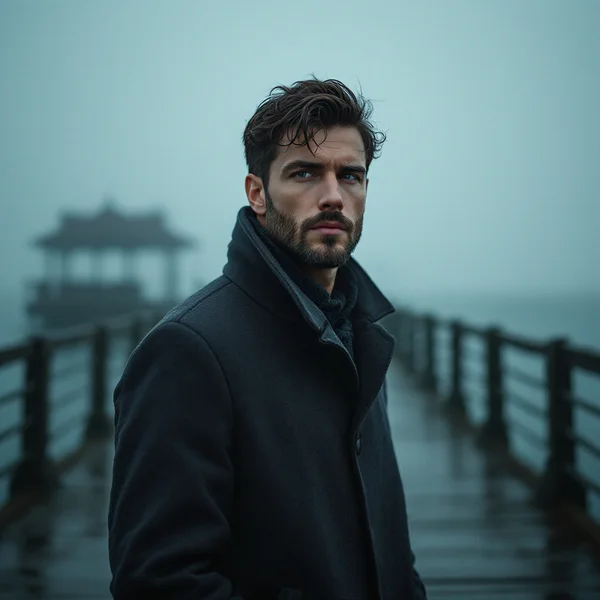
Cinematic portrait of a middle-aged sailor in a wool coat, rain on his face, dramatic side lighting, shallow depth of field, muted teal and orange color grading, 35mm film look
Product shot
Product photo of a matte black ceramic coffee mug on a light beige surface, soft diffused studio light, subtle shadow, minimalist composition, high detail
Food photography
Overhead food photography of a rustic bowl of ramen with soft-boiled egg, scallions and chili oil, wooden table, natural window light, steam rising, appetizing
Interior
Scandinavian living room interior, light oak floor, linen sofa, large window with morning sun, indoor plants, calm neutral palette, architectural photography
Fashion editorial
Editorial fashion photography of a woman in an oversized camel coat walking through a concrete brutalist courtyard, overcast soft light, confident pose, magazine cover aesthetic
Fantasy and concept art
Concept art of an ancient stone city built into a cliff above the clouds, waterfalls, flying ships, golden hour light, epic scale, highly detailed matte painting
Architecture and exterior
Modern two-story house with large glass windows and wooden facade, surrounded by pine trees, twilight with warm interior lights glowing, architectural visualization
Lifestyle photo
A natural, unposed everyday moment works well for brand feeds:
Lifestyle photo of friends sharing breakfast on a sunny balcony, candid laughter, linen tablecloth, fresh fruit and coffee, warm natural light, shot on a 50mm lens
Image-to-image: stylize a photo
Upload your shot and use a moderate strength:
Turn this photo into a watercolor illustration with soft washes of color, visible paper texture, delicate ink outlines
Tips for prompting FLUX.1 [dev]
Structure: subject, setting, light, style
The most predictable results come from prompts built in this order: what is in the frame, where it happens, what the light is like, and what style or camera you want. The model responds well to natural language, so write connected sentences rather than a pile of comma-separated tags.
Describe the lighting
Light is your strongest mood tool. Phrases like “soft diffused light”, “golden hour”, “neon reflections” or “dramatic side lighting” noticeably change the picture even when the subject stays the same.
Name the type of shot
Terms such as “product photo”, “editorial fashion photography”, “architectural photography” or “overhead shot” hint at the composition, angle and styling typical of that genre.
Change one thing at a time
Because the model is predictable, iteration is easy: keep a prompt that works and change a single element — color, angle, background. You will find the best version quickly without wasting credits.
Tune strength for image-to-image
If the result barely differs from the original, increase strength. If the model lost important parts of the composition, lower it. The prompt should describe the result you want, not what is already in the photo.
Check the details before publishing
Like any generator, the model can slip on fingers, small text or logos. For commercial work, inspect the result at full size and fix problem areas with another generation or an editor.
Use cases: who FLUX.1 [dev] is for
- Social media managers and creators — a steady stream of visuals for posts and stories at minimal cost.
- Marketplaces and online stores — backgrounds and mood for product photos, lifestyle scenes, banners.
- Bloggers and publishers — article illustrations, covers and topical images.
- Designers and architects — mood boards and quick concepts for interiors and facades.
- Game developers and writers — concept art, characters and locations for pitches and covers.
- Anyone on a budget — exploring ideas on FLUX.1 [dev] before a final render on a premium model.
A cost-efficient workflow
For teams with a high volume of visuals, a practical setup is to generate a batch of variants on FLUX.1 [dev] to settle composition, lighting and palette. The winning prompt is then either used as is or carried over to a premium model for the final version. That way, expensive generations are spent on a proven idea rather than on exploration.
FLUX.1 [dev] compared with other models
| Model | Strength | When to choose it |
|---|---|---|
| FLUX.1 [dev] | Classic, affordable, image-to-image with strength | High-volume content, drafts, photo stylization |
| FLUX.2 Pro | Photorealism, portraits | When people need to look as real as possible |
| FLUX 1.1 Pro Ultra | 4 MP without upscaling | Large images for print and banners |
| Nano Banana 2 | 4K, text in images | Posters, infographics, images with lettering |
| Ideogram V3 | Posters and flyers | Typography and ad layouts |
FLUX.1 [dev] wins on price and predictability, which makes it the economical choice for finding ideas and producing volume. If photorealistic portraits are the priority, see our FLUX.2 Pro review. For large images without upscaling, look at FLUX 1.1 Pro Ultra. And when the image needs legible text, Nano Banana 2 is the better fit.
Limitations
- One reference image. Image-to-image accepts a single picture; complex compositions built from several photos need other models.
- Not a text specialist. For posters and images with lettering, the catalog has models built around typography.
- Not the newest generation. Newer FLUX and Google models can deliver more realism and detail in portraits — at a higher price.
- Price depends on size. The base cost is for 1024×1024; the dashboard shows the cost for other sizes.
FAQ
How much does FLUX.1 [dev] cost?
A 1024×1024 image costs 4 credits, roughly five cents on any plan.
Can I generate from my own photo?
Yes, in image-to-image mode. Upload one image and adjust how strongly the prompt changes it.
What language should I write prompts in?
English — the model interprets it most accurately.
How does FLUX.1 [dev] differ from FLUX.2 Pro?
FLUX.1 [dev] is an affordable classic for volume and iteration. FLUX.2 Pro focuses on photorealism and portraits when top quality matters.
How many images do the free credits cover?
The 60 sign-up credits cover 15 images at 1024×1024.
Is it suitable for commercial content?
The model is widely used for marketing visuals, product scenes and social media. Before publishing, check small details such as hands, logos and tiny text.
FLUX.1 [dev] is a reliable, low-cost generator for everyday visual work, from ideas and drafts to finished images for social media and websites. Sign up, claim your 60 free credits and create your first image in WebTerra AI.
Try AI models yourself
Models for video, images and audio in one place — 60 credits free when you sign up
Start for free