Your photo as a cartoon: step by step
A photo of family or friends → a cartoon frame → a clip: the “🪄 Make it a cartoon” button, restoring the previous frame and photo tips.
The “Your photo as a cartoon” trend turns an ordinary photo of people into a 3D animated movie frame and brings it to life: smiles, hugs, warm music without words. Video models can’t turn a photo into a cartoon on their own — only the head becomes cartoonish — so there are two steps: first the image model Nano Banana 2 redraws the photo, then Veo 3.1 Lite animates the cartoon frame.
Step by step
- Open “Trends” and click the “Your photo as a cartoon” card.
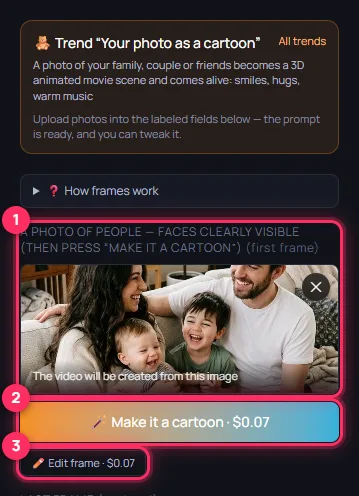
- Upload a photo into the “A photo of people — faces clearly visible (then press “Make it a cartoon”)” field (1 in the first screenshot).
- Click “🪄 Make it a cartoon” (2) — a separate frame edit for $0.13. It takes about 30 seconds; meanwhile the button says “Drawing the cartoon frame…”.
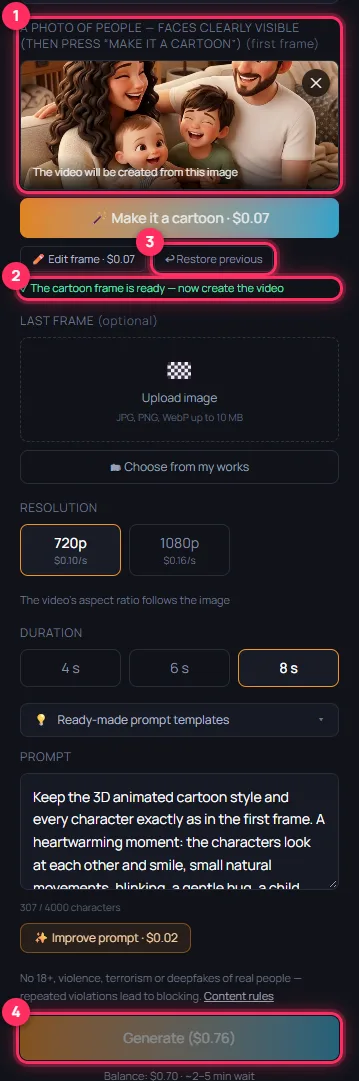
- The cartoon frame replaces the photo (1 in the second screenshot), and “✓ The cartoon frame is ready — now create the video” appears under it (2).
- Click the run button (4). The clip is 8 s and costs $0.76; the exact amount is on the button.
If you don’t like the frame
- “↩ Restore previous” (3) brings back the photo you had before the edit.
- “🪄 Make it a cartoon” can be pressed again — the model draws another version; each attempt is charged separately.
- “✏️ Edit frame” — fix the cartoon frame in words: “give everyone Santa hats”, “background — a winter park”.
Without the cartoon frame the clip won’t start: the form reminds you to press “Make it a cartoon” first. You can add an action to the clip prompt, for example they wave to the camera.
Which photo to use
- faces clearly visible, people looking roughly at the camera;
- a small group: in a crowd photo faces are tiny and the likeness suffers;
- even light without harsh shadows;
- by default the clip follows the photo’s aspect ratio; pick another (say, 9:16 from a landscape photo) under “Aspect ratio” — the frame gets cropped or extended with AI;
- only you and people who have given consent.
In the trial the cartoon frame gets a watermark, and the clip itself only runs after your first top-up. So it’s better to top up first and then draw the frame.