Renewing or changing a plan
How to extend the same plan, switch to another one and what happens when the term ends.
A plan never renews automatically, so there is nothing to cancel: it simply ends when the paid term is over. We remind you 3 days before the end.
Extending the same plan
Pay for the same plan again — the new days are added to your current term. You can extend at any time, even if the end is still far away.
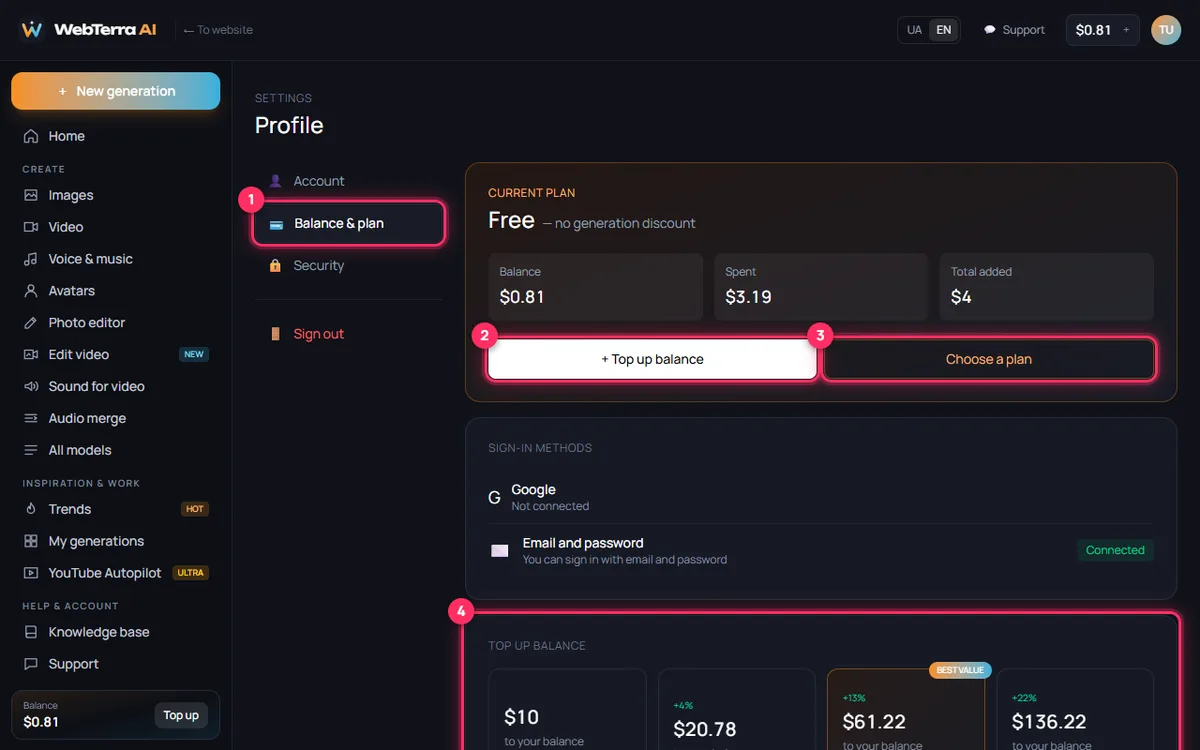
To do this, open the profile menu → “Plan & balance” to get to the “Balance & plan” tab (1 in the screenshot). While a plan is active, the “Choose a plan” button (3) reads “Renew or change plan”: click it and pick a plan and term.
Switching to another plan
The new term starts on the day of payment, and the rest of your current plan’s term is lost. Whatever is already on your balance stays and is valid for its 60 days from the day it was added. Your dashboard shows exactly what will happen before you pay.
When the term is over
- your account goes back to the free plan;
- plan money stays on your balance until its 60 days are up, top-ups have no expiry;
- generation prices stay the same — they don’t depend on the plan.